

01
Monthly accounting close
Reduces the end-of-month bottleneck by preparing invoice and expense data before it reaches accounting.
Automates
ClassificationAmountsTaxesDue dates
Outcome
Less manual review and faster closes.
Automatically process hundreds of invoices, receipts and delivery notes
Reduce the time spent on document entry by up to 90%.
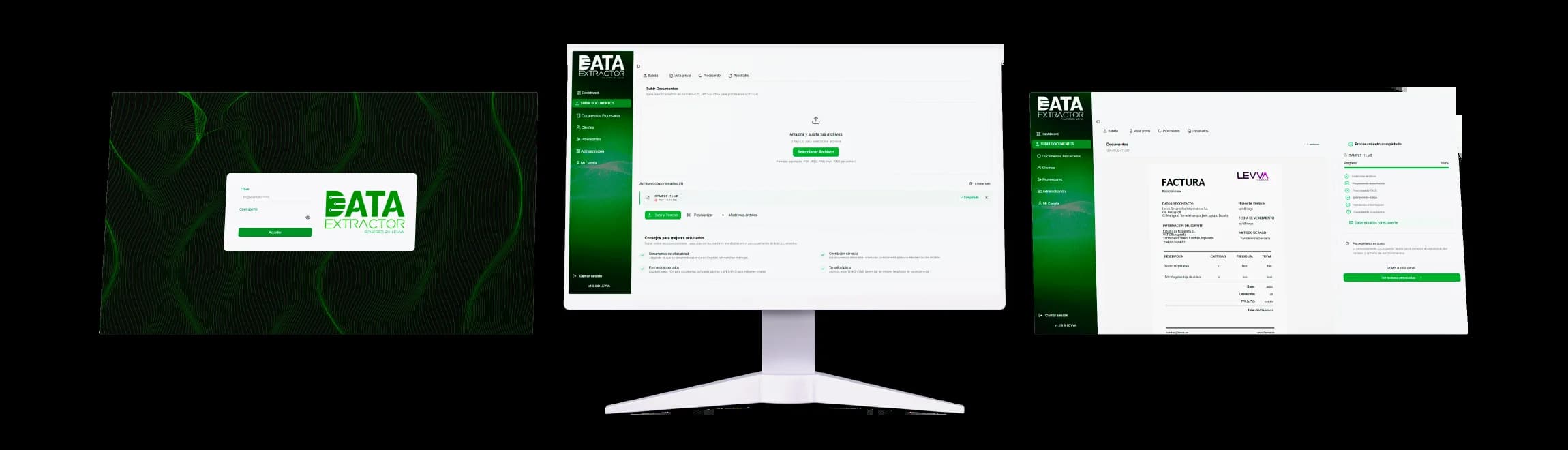
Data Extractor automatically reads and processes invoices, receipts and delivery notes, extracts the relevant data and prepares it for your accounting software. No manual data entry and no human errors.




Upload your documents
PDF, JPEG or PNG
AI extracts the data
Validate the information in seconds
Export the data to your accounting system
Upload your documents
PDF, JPEG or PNG
AI extracts the data
Validate the information in seconds
Export the data to your accounting system
Product
The product, the operational pain and how it solves it inside a real accounting workflow.
View FAQData Extractor reads administrative documents and extracts the fields needed to turn them into structured information. The goal is to remove repetitive work before accounting review.
When documents arrive by email, scanner or shared folders, teams copy amounts, dates, suppliers and taxes field by field. That work piles up, increases errors and leaves less time for higher-value tasks.
Data Extractor centralizes documents, extracts the required fields and makes information ready to validate. Teams review exceptions and important data instead of entering each document from scratch.
A module for the repetitive documents that consume the most admin time.
Automatically extract data from invoices, receipts and delivery notes and prepare them for your accounting software. No manual entry required.
processed in
less than 1 minute
Data Extractor reads, validates and structures invoice, receipt and delivery note data automatically — with no manual intervention, ready to import into your accounting system.
99.2%
Accuracy
24/7
Available
10x
Faster
How to read the performance figures
Speed, accuracy and savings figures are directional references for legible documents and repetitive workflows. Actual results depend on file quality, volume, required fields and client validations; demos use real documents to estimate expected time and accuracy.
Comparison · 100 invoices
Manual entry
invoices
Field-by-field entry, manual review and corrections.
Data Extractor
invoices
AI-powered extraction, validation and direct export.
Save more than 95% of the time spent on accounting data entry.
Monthly estimate · 8 h/day · 20 working days
One admin employee · manual entry
Documents / month
3.840
Time per document
2–3 min
Monthly capacity
1 admin employee
Work required for that volume
≈40,000 h
Data Extractor · AI processing
Documents / month
960,000
Time per document
<1 sec
Monthly capacity
≈250 admin employees
Work required for that volume
automated
Comparison
Other softwarevsData Extractor
Why choose us?
With Data Extractor you pay less while gaining speed, accuracy and peace of mind in managing your invoices. A smart solution that adapts to your business and budget.
Book a demo and discover how much time and cost you can save.
* Speed (< 1 min / 100 invoices), accuracy (99.2%) and time savings (95%) measured under standard processing conditions with medium-to-high quality PDF documents. Actual results may vary by format and resolution.
Use cases
For the moments when documents pile up and your team needs to move forward without manual data entry.
Reduces the end-of-month bottleneck by preparing invoice and expense data before it reaches accounting.
Less manual review and faster closes.
Centralizes files that arrive by email, scanner or shared folders and turns them into structured data.
Cleaner inboxes and data ready to review.
Helps compare orders, deliveries and invoices to spot differences before they reach administration.
Better purchase tracking and fewer repeated checks.
Turns receipts and tickets into organized information for reviewing team or project expenses.
Expenses that are easier to validate, group and export.
Matches bank movements with invoices, collections and payments to detect matches and discrepancies without reviewing line by line.
Operations reconciled faster and differences found before closing.
Makes it easier to find amounts, dates, suppliers and related documents when you need to justify operations.
Information found faster with less dependence on physical files.
Tell us how you work today and we will prepare a demo adapted to your real process, with no invented examples.

Documents are analyzed in a secure environment where data is automatically detected and structured without compromising confidentiality.
Secure management of users, permissions and full operation traceability.
Servers located in the European Union. Your documents stay within the EU legal framework and are never used to train AI models.

Official sources
Frequently asked questions
Data Extractor processes invoices, receipts, tickets, delivery notes and other administrative documents with accounting data. It can work with PDF files and images such as JPEG or PNG when quality allows the required fields to be read.
Automated processing can prepare batches of documents in minutes. Actual timing depends on volume, file quality, fields to extract and the validations required by each company.
It can extract supplier, date, invoice number, taxable base, taxes, total amount, due dates and other fields needed to review or prepare accounting data.
Data Extractor currently works with one active integration and can prepare structured exports for specific accounting workflows. In a demo we review your system and confirm technical fit before implementation.
Yes. Data Extractor is designed for sensitive documents, with access control, secure information handling and processes aligned with GDPR-oriented business data use.
Discover in 15 minutes how Data Extractor automates data entry into your accounting system.